Recipes
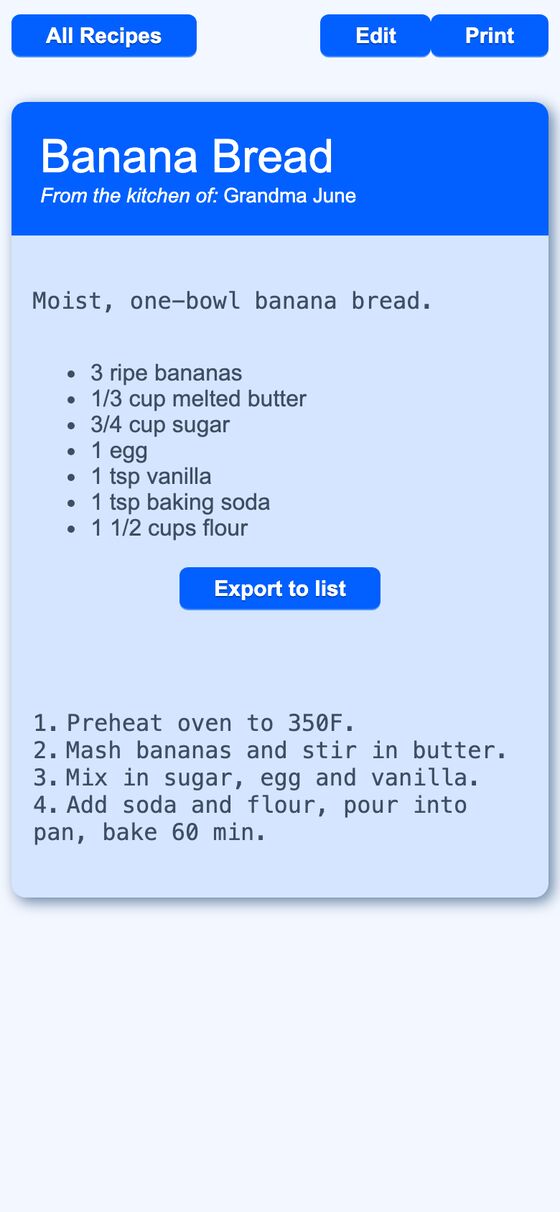
Recipes is a personal recipe box for saving recipes with ingredients, steps, servings, times, and notes. It also supports sharing by readable link, exporting ingredients to a shopping list, and printing recipe cards.
Recipes helps keep recipes in one place instead of scattered across notes or separate documents. It gives a single record for recipe details and formats them for browsing, sharing, shopping, and printing.
What it solves
Recipes helps keep recipes in one place instead of scattered across notes or separate documents. It gives a single record for recipe details and formats them for browsing, sharing, shopping, and printing.
It also reduces repeat work. Ingredients can be sent to a list in one action, shared recipes can be opened from a link, and long recipes can be printed in a card layout.
Features
- Recipe fields: It stores title, description, kitchen attribution, servings, prep time, cook time, notes, ingredients, instructions, and a public setting.
- Readable links: It uses friendly URLs based on the recipe title and adds a suffix when needed to keep them unique.
- Markdown content: Description, ingredients, notes, and instructions render with the site's Markdown dialect.
- Search filter: The recipe index includes a client-side filter box for finding recipes in the list.
- Export to list: It can add each ingredient line to one selected list and tag the items with the recipe name.
- No duplicates on export: Re-exporting the same recipe does not create duplicate list items because item names are upserted.
- Print layout: It provides a print view with a card layout or a full-page layout for recipes and notes pages.
- Slot picker: Each print slot can hold a recipe or a notes page and can be changed from the URL-driven picker.
- Printable formatting: Long recipes use text-density classes that reduce font size for crowded cards.
- Public and shared access: The index shows public recipes, owned recipes, and recipes shared to the current user.
How to use it
- Open the recipe index to browse recipes or use the search box to filter the list.
- Create a new recipe and fill in the title, ingredients, instructions, and other optional fields.
- Mark the recipe public if it should appear in the public list.
- Open a recipe to view the formatted content or follow its readable link.
- Use Export to list to choose a list and send the ingredient lines into it.
- Open the print view to place recipes into card slots or switch to the full-page layout.
- Use the slot picker to replace any slot with another recipe or a notes page.
How it works
- The index is built from recipes that are public, owned by the current user, or shared to the current user.
- Recipe links use a friendly slug and fall back to the recipe id when needed.
- Ingredients and instructions are parsed from line-based text formats for export and display.
- Exported ingredients are added to lists as tagged item names, and existing names are updated instead of duplicated.
- The print view stores slot state in the URL so the page can be bookmarked and reproduced.