Meal Builder
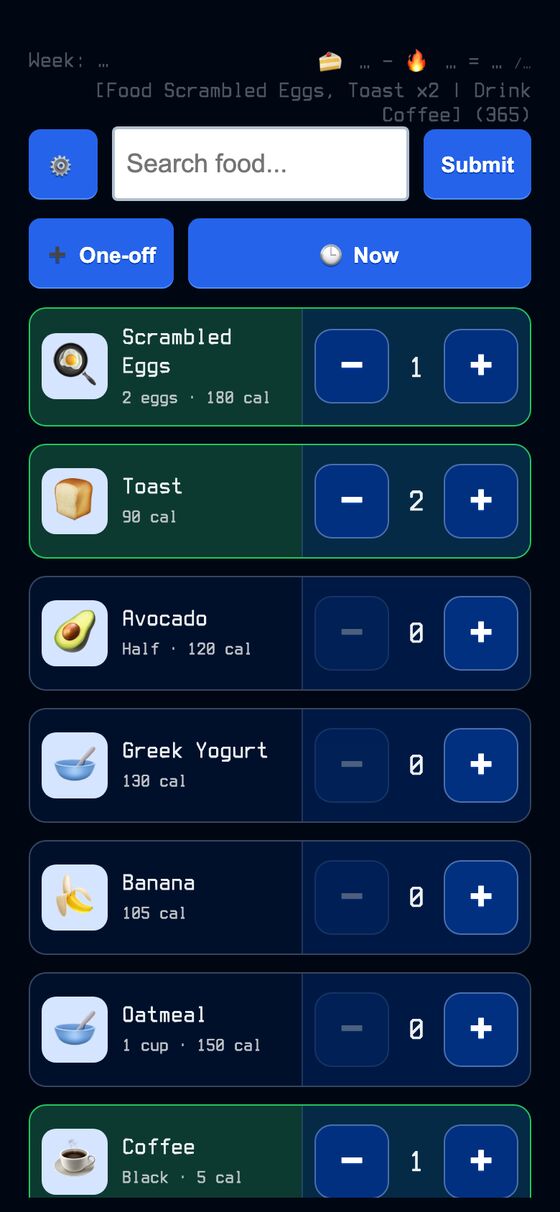
Meal Builder is a personal meal logger built around reusable food palettes. It lets a user pick foods from a grid, total the calories, and write the meal to the app’s event log.
It reduces repeated meal entry by keeping a saved palette of foods that are eaten often. A meal can be assembled quickly by tapping items, including multiples and one-off items that are used only for that entry.
What it solves
It reduces repeated meal entry by keeping a saved palette of foods that are eaten often. A meal can be assembled quickly by tapping items, including multiples and one-off items that are used only for that entry.
It also handles the timing of a meal. The entry can be saved for the current moment or backdated to the time it was actually eaten, so the logged meal lands on the correct day.
Features
- Multiple builders A user can keep more than one named builder and switch among them.
- Food tile grid Foods appear as tiles that can be tapped to add them to a meal.
- Multiple counts Tapping an added item again records multiples such as x2.
- Live totals The page shows a running calorie total and a one-line meal summary.
- Fuzzy search Items can be found by category, name, or tag.
- One-off items Temporary items can be added for a single meal without saving them to the palette.
- Meal time picker A meal can be logged for now or for a past date and time.
- Inline editing Items can be added, edited, deleted, and reordered in a modal editor.
- Quick Edit The full palette can be edited as plain text, one item per line.
- Optional calorie strip A dashboard strip can show calorie figures when the related monitor data is available.
How to use it
- Open the list of meal builders and choose the builder you want to use.
- Tap food tiles to add items to the meal, and tap again if you need more than one.
- Use search to find an item, or add a one-off item if it is not in the palette.
- Choose the meal time if it was eaten earlier than now.
- Review the calorie total and the summary line.
- Submit the meal to write it to the event log.
- Use edit mode or Quick Edit to change the palette when needed.
How it works
- The builder stores items as a JSON array in the meal builder record.
- The palette has a line-based text format that is parsed on both the server and the client.
- Submitting a meal sends a natural-language log command through ActionCable, rather than a standard HTTP form submit.
- The command processor extracts the time, creates an action event, and queues broadcast work.
- The page uses client-side row reconciliation and drag reordering for editing and palette updates.